Tally TDL WhatsApp Automation: How the Connector Works
A TDL can bring a WhatsApp action into TallyPrime, but it is only one part of the workflow. TallyWhatsApp combines the Tally-side TDL with a Windows connector and a QR-paired WhatsApp account. Together they can prepare an invoice PDF and recipient message for the operator to review and send.
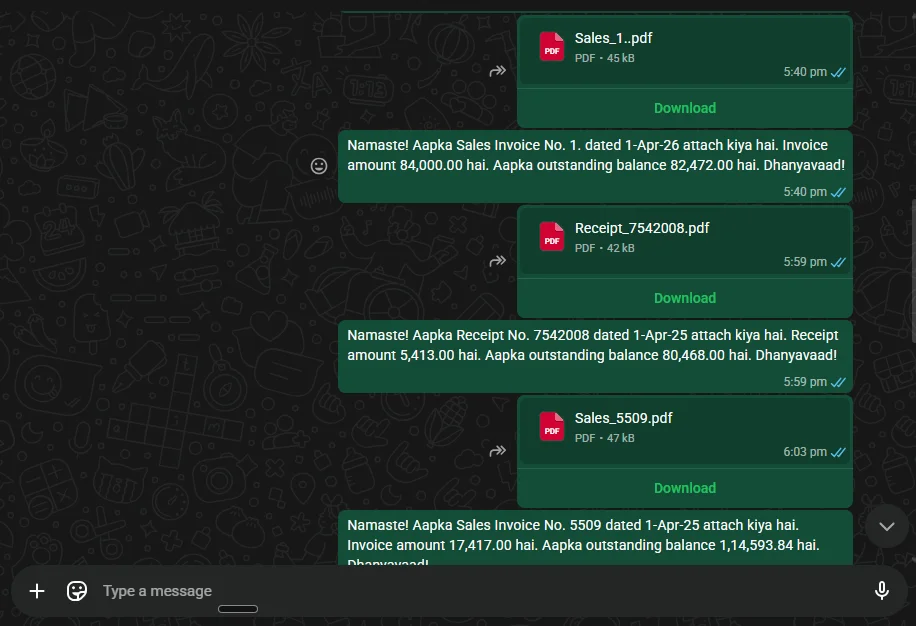
What the TDL Does
TDL, or Tally Definition Language, is Tally's customisation language. It can add actions to voucher and report screens and work with the data already available in Tally. In this setup, the TDL exposes the send action and passes supported voucher details to the Windows connector. The connector handles document preparation, account pairing, and the WhatsApp sending workflow.
That division matters when you troubleshoot. If the button is missing, check whether the TDL loaded. If the button appears but WhatsApp is disconnected, check the desktop connector and paired account. If the wrong PDF is prepared, inspect the Tally print format and voucher data. Our troubleshooting guide walks through these branches.
Invoice Flow from Tally to WhatsApp
- Load the TDL. In TallyPrime, use F1 (Help) > TDLs & Add-Ons > F4 (Manage Local TDLs) to load the included
_loader.tdl. - Pair the account. Open the Windows dashboard and scan its QR code from WhatsApp's Linked Devices screen on the phone.
- Open a supported voucher. Use a sales invoice with a known party number and a print format you have checked.
- Review the prepared send. Confirm the recipient, caption, and PDF. If any field is wrong, correct it in Tally or the connector settings before dispatch.
- Confirm and inspect the result. Send from the Tally action, then check the result and the test recipient's phone.
The invoice workflow guide explains what is prepared automatically and why the operator still confirms the message. For a first install, use the complete setup guide.
What “Automation” Means Here
The useful automation is fewer repeated exports, number lookups, and manual file attachments. It does not mean that every saved Tally voucher should be sent without review. Customer numbers can change, invoice formats can differ, and a failed WhatsApp connection can interrupt dispatch. Run a small trial using your own company data before depending on the workflow for daily billing.
If you are evaluating a fully unattended notification system, describe that requirement to a partner. It is a different operational question from adding a send action to a Tally form. For outstanding payments, read the reminder guide and verify the current bill balance before sending.
Tally's Built-In WhatsApp Route Is Separate
TallyPrime Release 4.0 and later also provide a built-in WhatsApp sharing route. Tally documents TDL actions for that feature and a document-sharing workflow using WhatsApp Business onboarding through Interakt. TallyWhatsApp's QR-paired connector is a separate product. Compare the account setup, templates, support, and license terms before deciding which route fits your office.
Common Questions
Does TallyWhatsApp need the Meta Business API?
No. TallyWhatsApp uses a Windows connector and QR pairing with a WhatsApp account. TallyPrime's separate built-in service uses business onboarding through Interakt.
Does the TDL send an invoice by itself?
The TDL adds the Tally-side action and passes supported voucher details to the connector. The operator reviews the recipient and PDF and confirms the WhatsApp send.
Which Tally releases should I test?
Test the exact TallyPrime or ERP9 release and invoice format used in your office during the TallyWhatsApp trial.
Where does invoice data go?
The Tally connector runs on Windows, and document content is delivered through WhatsApp. Website lead capture and licensing use online services. Review the privacy policy for details.
Test the TDL with your own invoice
Start the 14-day trial, load the TDL, and check one complete send before rolling it out to the office.
Start 14-Day Free Trial