What Is TDL in TallyPrime? Beginner's Guide to Tally Definition Language
If you've been using Tally for any length of time, you've probably heard the term "TDL." But what exactly is tally prime tdl? In this comprehensive beginner's guide, we'll demystify Tally Definition Language, explain how it works, and show you how to load TDL files to customize your accounting software effortlessly.
Introduction to TDL
TDL, or Tally Definition Language, is the fundamental programming language that Tally Solutions uses to create its famous accounting software, including Tally ERP9 and TallyPrime. It is what makes Tally so powerful and flexible.
Think of TDL as the building blocks of Tally. Every screen you see, every report you generate, and every button you click in Tally is built using Tally Definition Language. What makes this so remarkable is that Tally Solutions allows third-party developers and users to write their own TDL code to modify or add to the default behavior of the software.
How Does TDL Work?
Unlike traditional programming languages that require complex compiling and linking processes, tally prime tdl is an action-driven language designed specifically for rapid development in a business environment.
When you create a customized feature, you write the code in a simple text file and save it with a .tdl extension. Or, more commonly, a developer provides you with a compiled TDL file (often ending in .tcp - Tally Compliant Product). When Tally starts up, it reads these files and dynamically changes its menus, forms, and reports based on the instructions inside.
You can read more about sending messages in our tutorial on sending WhatsApp via TDL to see how this practically works.
Common Uses of TDL
The applications for Tally Definition Language are nearly endless. Because almost any aspect of Tally can be customized, businesses use TDLs for a wide variety of tasks:
- Custom Reports: Generating specialized sales, inventory, or financial reports that aren't available by default.
- Invoice Customization: Adding company logos, specialized terms and conditions, or custom fields to invoices.
- Automated Communications: Integrating with SMS gateways or WhatsApp to send notifications to clients.
- Data Validation: Enforcing strict rules on data entry to prevent mistakes by accounting staff.
- GST Enhancements: Making GST compliance smoother by adding tailored features for specific industries.
If you're wondering how TDL compares to other methods of integration, check out our Tally Customization Comparison.
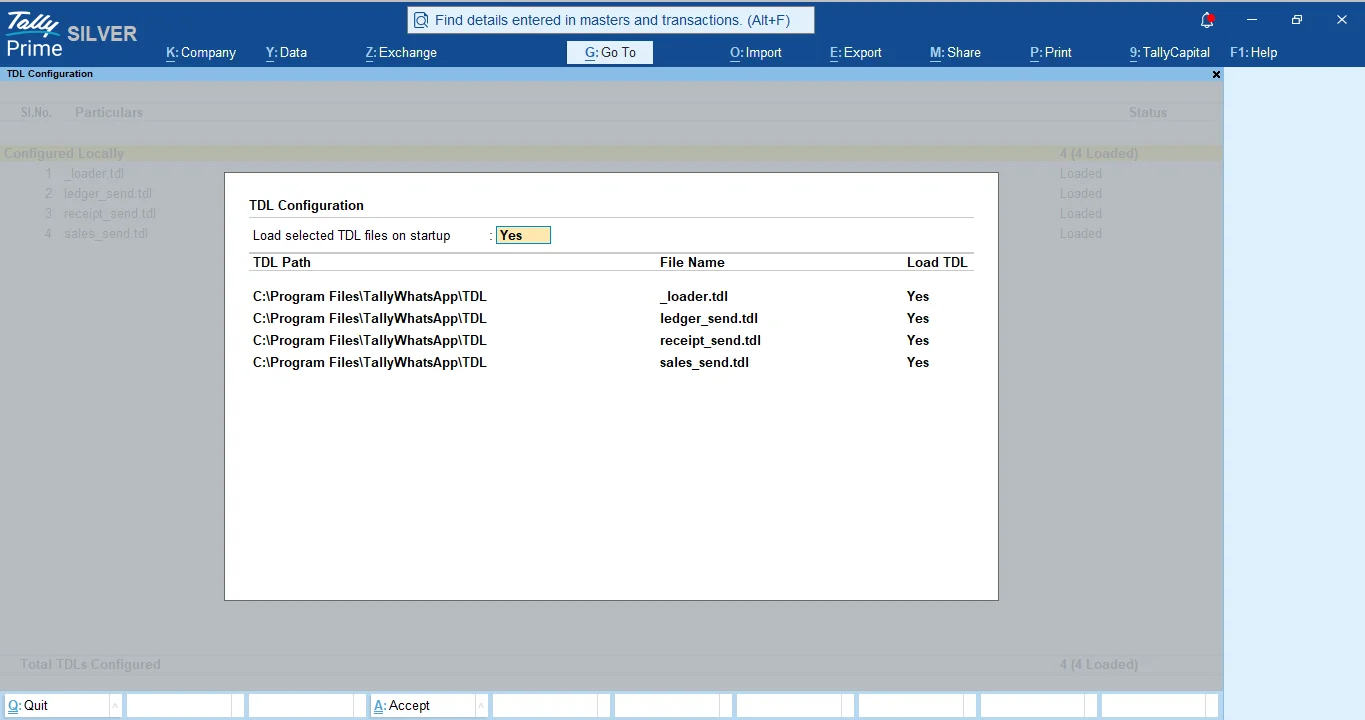
How to Load a TDL File in TallyPrime
Loading a tally prime tdl file is a very straightforward process. You do not need to be a programmer to do this. Follow these simple steps:
- Open TallyPrime.
- Press F1 (Help) on the top menu bar, then select TDL & Add-On (or press Ctrl+Alt+T).
- Press F4 (Manage Local TDLs).
- Set "Load selected TDL files on startup" to Yes.
- In the list, specify the file path where your .tdl or .tcp file is saved (e.g., C:\TallyAddons\my_custom_tdl.tcp).
- Press Enter to accept and save the screen.
Once you save, Tally will immediately load the TDL, and you will see the new features appear in your menus or screens.
How TallyWhatsApp Uses TDL
At TallyWhatsApp, we leverage the power of tally prime tdl to seamlessly integrate WhatsApp messaging directly into your accounting workflow. Instead of using complex external bridging software, we use a specialized TDL file.
When you load our TDL into your TallyPrime, it adds a new "Send WhatsApp" button (Alt+J) directly to your voucher screens. Behind the scenes, the TDL handles extracting the invoice details, generating a PDF, and securely communicating with our desktop application to dispatch the message via your paired WhatsApp account.
This deep integration means you never have to leave Tally to send an invoice. For more details on this, you can read about our WhatsApp Automation using TDL.
Frequently Asked Questions
What does TDL stand for?
TDL stands for Tally Definition Language. It is the core programming language used by Tally Solutions to build TallyPrime and Tally ERP9.
Is TDL difficult to learn?
For end-users, you don't need to learn how to write TDL to use it. You simply need to know how to load a pre-written TDL file into your software, which only takes a few clicks.
Ready to try it?
Experience the power of TDL integration by sending invoices and reminders on WhatsApp directly from TallyPrime.
Download 14-Day Free Trial